
Find out which posts bring customers.
Likes don't pay the bills. PostBuzzPro connects each post to the clicks, sign-ups and sales it caused, and to the people who commented before they bought.
What you get
Tracked links, automatically
Links in a post become short tracked links with UTM tags when it's published. Link-preview bots aren't counted.
Sales from your site and Stripe
A small website snippet records sign-ups and purchases. Or connect a Stripe webhook and every checkout is credited to the right post.
"How did you hear about us?"
Add one line to your sign-up form. Answers appear next to what was tracked, so you also see word of mouth.
People, not just numbers
See who commented, then clicked, then bought. Choose whether the first or last click gets the credit.
Server-side conversions
Your developer can send sign-ups and purchases from your server with an API key, for apps where a snippet doesn't fit.
Customer journeys
Each sign-up or purchase with the posts and interactions that led to it, for example commented, then clicked, then bought.
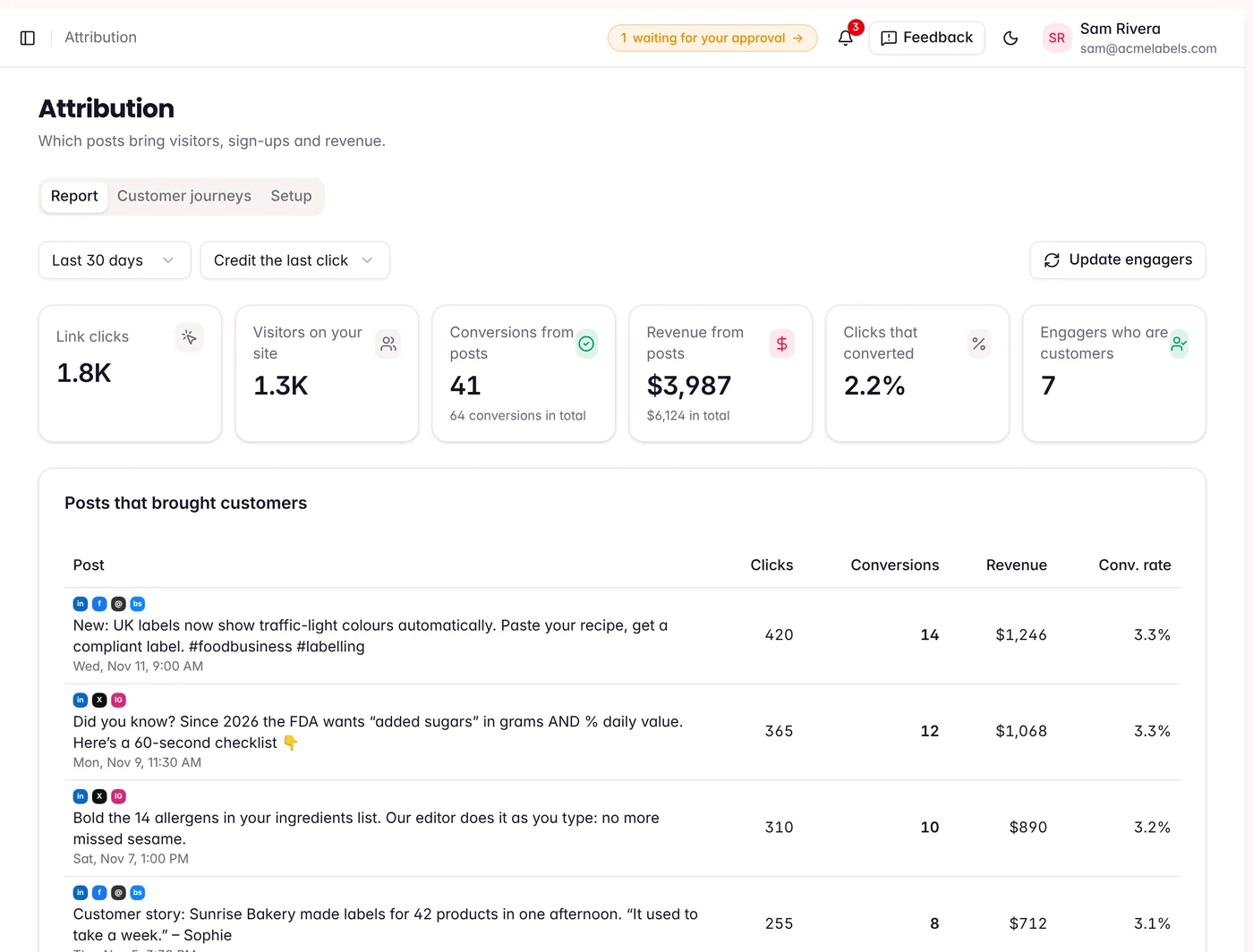
Posts ranked by what they earned
The Report tab ranks posts by revenue, conversions and clicks, shows survey answers next to what was tracked, and lists the people who engaged and are customers.
Example data, for illustration.
Up and running in 5 steps
Keep tracked links on
Every link in a published post becomes a tracked link, one per post and account.
Add the snippet
Copy it from Attribution → Setup and paste it before </head> on every page of your site.
Report sign-ups and sales
Call the snippet's track function, add the survey box, or paste your Stripe webhook signing secret.
Match people
Optionally import a customer list (a CSV with an email column) so commenters can be matched to customers.
Read the report
Posts ranked by revenue, conversions and clicks, results by network and the people who engaged and bought.
The details that matter
Limits and rules, straight from the PostBuzzPro help pages.
| Network | What it shares for matching |
|---|---|
| Instagram, Facebook Pages, Threads, YouTube | Commenters |
| Bluesky, Mastodon | Commenters, likes and reposts |
| X, LinkedIn, TikTok, Pinterest, Telegram, Discord, Quora | Nothing |
How tracking works
- Links get
utm_source(the network),utm_medium=social,utm_campaign=postbuzzproandutm_content(the post), unless they already have their own. - A link is left unchanged if tracking would push the post over the network's character limit.
- Who interacted is collected every 6 hours for 30 days after posting.
- Customer lists: a CSV with an email column, up to 20,000 rows. Purchase values are sent in cents.
Privacy
- The snippet sets only a first-party visitor id on your own site. There's no cross-site tracking or fingerprinting.
- Load it after cookie consent where the law requires that, and mention PostBuzzPro in your privacy policy as a processor for analytics.
- Emails and handles are stored for matching. The engager list on a post never shows emails.
Questions about attribution
How does PostBuzzPro know which posts bring customers?
Links in your posts become tracked links. A small snippet on your website, or a Stripe webhook, reports sign-ups and purchases, and an optional "How did you hear about us?" box records what people tell you. PostBuzzPro joins these up and ranks posts by customers and revenue.
Is the tracking privacy-friendly?
The snippet sets only a first-party visitor id on your own site. There's no cross-site tracking or fingerprinting. Load it after cookie consent where the law requires that, and mention PostBuzzPro in your privacy policy.
Do I need Stripe?
No. Stripe is optional. The website snippet, the survey box or server-side conversions work without it.
Why aren't X or LinkedIn in the engager lists?
Those networks don't share who engaged with a post. Clicks on tracked links from every network are still counted.
Works well with
Know which posts are worth it.
Tracked links, your site, Stripe and a one-line survey, joined up in one report.